
Add Bassethound to ChatGPT
Add Bassethound to ChatGPT as a custom MCP connector so it can run sniff_domain inside a conversation.
ChatGPT connects to remote MCP servers through custom connectors. Bassethound is one hosted URL.
Custom plugins are available on paid ChatGPT plans (Plus, Pro, Business, Enterprise, Edu) and may sit behind developer settings. Exact labels shift as the feature matures; look for Plugins or Connectors in settings.
Add the connector
-
Open Settings → Plugins, then Browse plugins.
-
Click the + button beside the plugin search to open the New Plugin dialog.

-
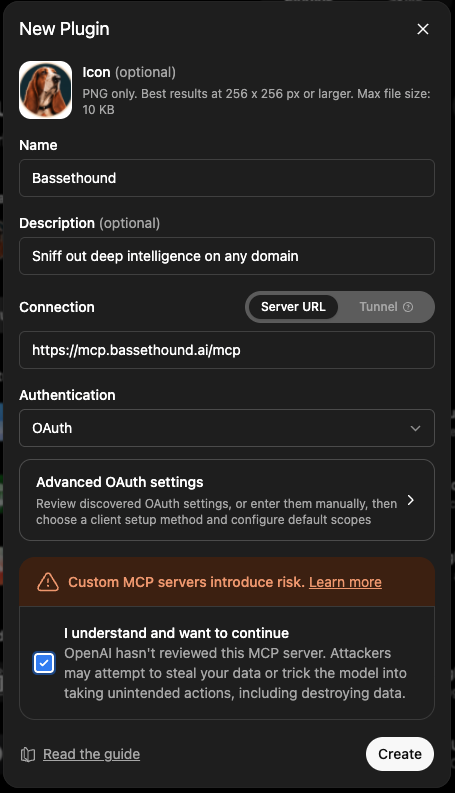
Fill it in:
- Name:
Bassethound - Description (optional): Sniff out deep intelligence on any domain
- Connection: Server URL, set to
https://mcp.bassethound.ai/mcp - Authentication: OAuth
- Icon (optional): the Bassethound badge (PNG, 256 x 256)
- Name:
-
Check I understand and want to continue, then click Create.
-
Authorize Bassethound when prompted to sign in. Signing in is what puts you on the free tier; from there Pro raises the limit.
Use it
Start a chat, enable the Bassethound connector (or turn on tools / developer mode for the conversation), and ask:
sniff stripe.com
ChatGPT calls sniff_domain and returns the dossier.
ChatGPT applies more guardrails to connectors than a coding client does; some surfaces historically limited connectors to search and fetch style tools. If a tool call is blocked, confirm developer mode or full tool access is on for the chat.
For the current steps, see OpenAI’s connector documentation at help.openai.com.