
Add Bassethound to Claude
Add Bassethound to Claude from the connector directory, or by URL as a custom connector, in claude.ai on the web or in Claude Desktop.
Claude talks to Bassethound through a connector (a remote MCP server). Add it from Claude’s directory, or point Claude at the endpoint yourself. Here is each surface.
Both routes work on every Claude plan, Free included, though Free is capped at one custom connector. Exact menu labels move around; if something is renamed, look for Connectors or MCP.
claude.ai (web)
Bassethound is listed in Claude’s connector directory, so there is nothing to paste.
-
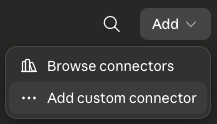
Open the Bassethound listing and click Connect. You can also get there inside Claude from Settings → Connectors → Add → Browse connectors, then search for Bassethound.
-
Authorize Bassethound when prompted to sign in. Signing in is what puts you on the free tier; from there Pro raises the limit.
-
In a chat, open the connectors menu, enable Bassethound, then ask:
sniff stripe.com
Or add it by URL
The directory listing and a custom connector point at the same endpoint, so either route gets you the same tools.
-
Open Settings → Connectors.
-
Click Add, then Add custom connector.
-
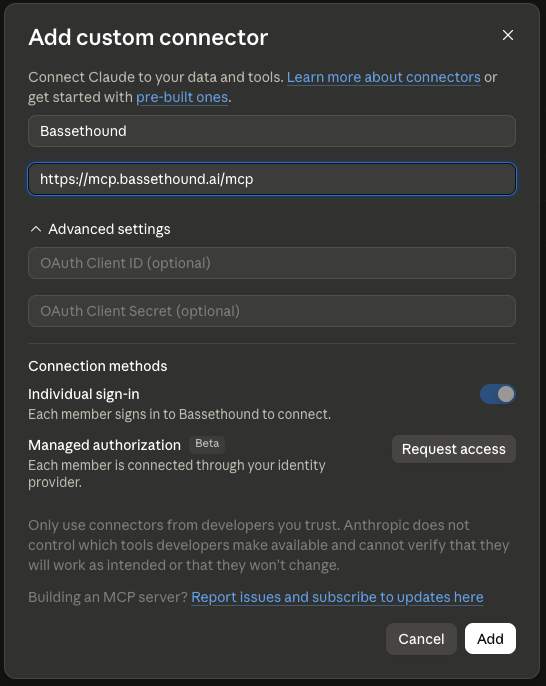
Name it
Bassethoundand paste the URL:https://mcp.bassethound.ai/mcpLeave Individual sign-in on, then click Add.
-
Authorize and enable it exactly as in steps 2 and 3 of the directory route above.
Claude Desktop
One directory serves every Claude surface, so Desktop takes the same short route: Settings → Connectors → Add → Browse connectors, then search for Bassethound and click Connect.
To point Desktop at the endpoint yourself instead:
- Open Settings → Connectors → Add custom connector.
- Paste
https://mcp.bassethound.ai/mcpand save, then authorize Bassethound when prompted to sign in. - Restart Claude Desktop if the tool does not appear.
Claude Code
Prefer the terminal? Claude Code adds Bassethound in one line. See Add Bassethound to Claude Code.
For the current, canonical connector steps, see Anthropic’s docs at support.anthropic.com.